
Simple screenshot utility
Sometimes I feel like I spend half of my life at Softonic taking screenshots, so I know what's important when it comes to screenshot programs. We use SnagIt in the office, but there are plenty of other options out there such as WinSnap.
This little program has a simple, uncluttered interface that is really very attractive. There is a large preview window where you can see the screenshot you have just taken, as well as viewing how it looks with some of WinSnap's effects added. The program has a full selection of hotkeys so that taking screenshots - of the desktop, windows, regions of the screen and more - can be done as quickly as possible.
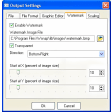
WinSnap has plenty of configuration options: you can toggle whether or not to include the mouse, delay the shot (useful for when you want to capture open menus, etc.) and even fine-tune any of the WinSnap effects, contours, watermarks and shadow included. This version of the program is especially optimized for Windows Vista and 7, which means that it has no problem with rounded window edges or transparent borders.
WinSnap is a nice program that is attractive, simple and efficient. In fact, if I was new to screenshots and wanted a no-fuss program with almost no learning curve, it would be prefect. More experienced users, however, will miss the advanced configuration options available with other programs, and the huge watermark placed on all WinSnap images in the trial version is sure to be a problem for lots of users.
WinSnap is perfect for screenshot newbies.
Updated languages: German, SlovenianAdded test support of Windows 8 Developer PreviewFixed issue with clearing Tools menu preferences after restartFixed issue with "dwmapi.dll not found" error on Windows 2000/XP
Changes
Updated languages: German, SlovenianAdded test support of Windows 8 Developer PreviewFixed issue with clearing Tools menu preferences after restartFixed issue with "dwmapi.dll not found" error on Windows 2000/XP









.png)






















User reviews about WinSnap
Have you tried WinSnap? Be the first to leave your opinion!